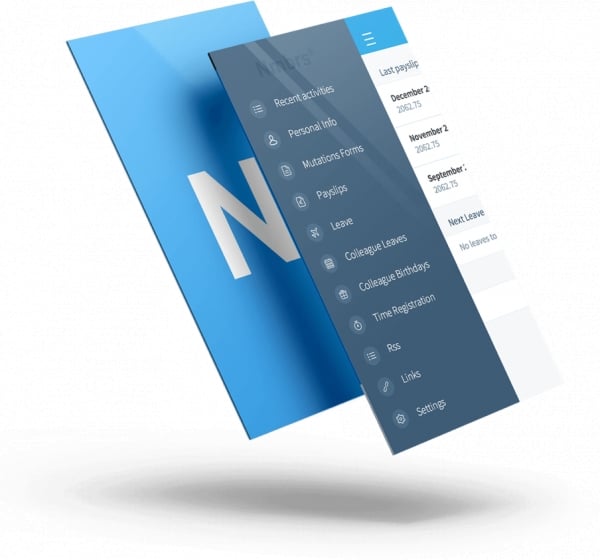
Nmbrs®

  • Start-up
  • SMEs
  • Large company
  • Cloud
  • Mobile app

Price On request

Compare with alternatives
Gallery
Unique Selling Points
  • HRM services | The integrated HRM functionality gives you opportunities to expand your services.
  • Easy to integrate | Nmbrs® is easy to integrate with other applications via our extensive API.
  • Double your practice | By combining your expertise with our application, you can serve more and larger clients
  • More time for strategy | Nmbrs® ensures that you can offer optimal HR services with minimal effort.
  • Unprecedented efficiency | Nmbrs® Business literally takes the work off your HR managers' hands.

Nmbrs® at a glance

  • Category: Payroll software
  • Indicative price: €1–€25 per user per month
  • Rating: 3,0 out of 5, based on 7 reviews
  • Free trial account, demo on request, cloud software, available in Dutch

Compare Nmbrs® with 12 other packages for payroll software

Software info

Nmbrs is an HR and payroll software supplier based in Amsterdam, serving the Dutch and Swedish markets. In developing our HR and payroll software, the emphasis is on the role of HR. By involving all key users, including the employee, we ensure that optimal HR services can be provided with minimal effort.

Nmbrs offers software for the SME market, allowing companies to process their entire HR and payroll themselves. Nmbrs also offers a solution for accountants and payroll service providers, who can use our software to handle the complete personnel administration for their clients.


Nmbrs® features

  • Automatic step increase
  • Digital personnel file
  • Adding your own arrangements
  • Salary payment file
  • Pay scale integration
  • Pro forma
  • Retroactive calculations (TWK)
  • Absence file
  • WKR
  • Time tracking
2 - 10 employeescheck
11 - 25 employeescheck
26 - 50 employeescheck
51 - 75 employeescheck
76 - 100 employeescheck
101 - 150 employeescheck
151 - 200 employeescheck
201 - 250 employeescheck
251 - 300 employeescheck
301 - 350 employeescheck
351 - 400 employeescheck
401 - 500 employeescheck
500 or more employeescheck
1 employeecheck
i Automatic step increasecheck
i Digital personnel file check
i Adding your own arrangementscheck
i Salary payment filecheck
i Pay scale integration check
i Pro forma check
i Retroactive calculations (TWK)check
i Time trackingremove
i Absence filecheck
i WKR check
i Backupscheck
i IP address securitycheck
i Data storage in Europe check
i Flexible user rights check
i Single Sign On (SSO)check
i Two-factor authenticationcheck
i Healthcarecheck
i Construction and installationcheck
i Facility servicescheck
i Hospitalitycheck
i ITcheck
i Social servicescheck
i Retailcheck
i Pharma and chemicalscheck
i Accountancyremove
i Agricultural sectorcheck
i Automotivecheck
i Educationcheck
i Tradecheck
i Industrycheck
i Logisticscheck
i Mediacheck
i Online servicescheck
i Petroleum marketremove
i Productioncheck
i Recreationcheck
i Temporary staffingremove
i Real estate sectorcheck
i Governmentcheck
i Business servicescheck
€1 to €5check
€5 to €10check
€10 to €25check
€25 to €50remove
€50 to €75remove
€75 to €100remove
€100 or moreremove
i Visitor registrationremove
i Communication via softwarecheck
Sharing news itemscheck
i Internal chatremove
i Logremove
i Online calendarremove
i Process alertscheck
i Timelineremove
i Forms and templatescheck
i Storing documentscheck
i Dividend tax returnremove
i Payroll tax returnremove
i VAT return remove
i VAT overview remove
i Income tax returnremove
i KOR insightremove
i ICP return remove
i PKIoverheid certificate remove
i VAT supplementary return remove
i Deferral arrangement remove
i Provisional income tax assessment returnremove
i Provisional corporate income tax assessment returnremove
i Corporate income tax returnremove
i Employment contractcheck
i Company propertyremove
i Contract managementcheck
i Employee Self Servicecheck
i Mobile appcheck
i Organisation chartremove
i Employee profilescheck
i Multiple leave typescheck
i MSScheck
i MSS appremove
i Job profile templatescheck
€0remove
€1 to €100remove
€100 to €500remove
€20.000 or moreremove
€5.000 to €20.000remove
€500 to €5.000remove
i Complaint registrationremove
i Process descriptions remove
i Registering inspectionsremove
i Improvement proposalsremove
i Work instructions remove
i Checking availability remove
i Repeating shifts remove
i Optimal staffing levelremove
i Onboarding schedulesremove
i Multiple locations/departmentscheck
i Open shiftsremove
i Call-out notificationsremove
i Calculating breaks remove
i Staff schedulingcheck
i Scheduling based on budgetremove
i Scheduling based on expected wage costsremove
i Allowancescheck
i Weather forecast remove
i Swapping working hours/shifts remove
i API check
i Cloudcheck
i Sandboxcheck
i Serverremove
i Self-learning softwareremove
i Subscriptioncheck
i One-off paymentremove
i Freemiumremove
i Free trial accountcheck
i On requestremove
i Per unitremove
i Analysis and reportingremove
i Deliveryremove
i Accountingremove
i CRMremove
i Accounts receivableremove
i Expense claimsremove
i Digital signingremove
i Document managementremove
i EHRremove
i ERPremove
i Invoicingremove
i Invoice processingremove
i Taxremove
i Flexible payrollremove
i Helpdeskremove
i HRMcheck
i Integration softwareremove
i Annual accountsremove
i POSremove
i Quality managementremove
i Quotationremove
Training managementremove
i Staff schedulingremove
i Process managementremove
i Product configurationremove
i Production planningremove
i Project managementremove
i Recruitmentremove
i Bookingremove
i Mileage trackingremove
i Payrollcheck
i Salesremove
i Service managementremove
i Talent managementremove
i Time trackingremove
i Absencecheck
i Inventory managementremove
i Webshopsremove
i Work ordersremove
i Software democheck
i Creating tasksremove
i External party login remove
i Status of ongoing tasksremove
i Task overviewremove
i Assigning rolesremove
Arabicremove
Danishremove
Germancheck
Englishcheck
Finnishremove
Frenchremove
Italianremove
Mandarinremove
Dutchcheck
Norwegianremove
Polishremove
Portugueseremove
Russianremove
Spanishremove
Czechremove
Turkishremove
Swedishcheck
i SMEscheck
i Non-profitcheck
i Large companycheck
i Multinationalsremove
i Start-upcheck
i Foundationcheck
i Associationcheck
i Freelancerremove
i Approving hoursremove
i Activity timerremove
i Absence registrationremove
i Automatic time trackingremove
i Collective labour agreement (CAO) rulesremove
i External hours validationremove
i Matching time to a customerremove
i Clocking inremove
i Insight into hours balancesremove
i Mobile appremove
i Plus and minus hours remove
i Time trackingremove
i Occupational physician login check
i Third-party login remove
Separation of medical and non-medical dataremove
i Status overview per employee check
i Absence protocol in line with the Gatekeeper Actcheck
i Employee logincheck
i Designing and adapting workflowscheck
i Workflow management check
Nmbrs® integrations
See which systems the software integrates with
  • check Absentiemanager
  • check AFAS software
  • check Asperion
  • check Comandi Dashboards
  • check Ctrl
  • check Daywize
  • check Declaree
  • check Dyflexis
  • check e-Boekhouden
  • check Eitje
  • check Exact Boekhoudgemak and Multivers
  • check Exact Online
  • check Ezora
  • check Informer
  • check Linda
  • check Mijnrooster
  • check Minox
  • check Moneybird
  • check MuisSoftware
  • check Nedap
  • check Nostradamus
  • check Pink web applications
  • check Reeleezee
  • check SecureLogin
  • check ShiftBase
  • check Snelstart
  • check Sympa HR
  • check TimeChimp
  • check Twinfield
  • check Visionplanner
  • check Visma
  • check Werktijden
  • check Yoobi
  • check Yuki
Prices
Pricing models:
Subscription i
Free trial account i
Indicative cost from p/m:
On request

Nmbrs® review

Write a review

Overall score

3,0 from 7 reviews
  • Security
    3,1
  • Ease of use
    3,3
  • Performance
    2,3
  • Value for money
    3,1
  • Software supplier service
    2,6

TdW

  • 11 to 25 employees
  • Business services

Reviewed on 24-06-2025 10:42


Pros

add_circle Quick to learn, 'flat' system.


Cons

do_not_disturb_on - Poor support. Some urgent calls are only resolved after weeks (!). The response is often that it has been passed on to the 'product owner' and that a reply is still awaited. - Performance is very poor. Frequent crashes and problems with stored cookies. - Functionality is often unfinished and/or prone to bugs. When this is pointed out, we often get the response that they 'regret it and acknowledge the problem'. They then say that they do not know if and when it will be fixed. Examples: The overviews of employer costs. The column with the average costs is in all cases divided by 13, even if the person has only been employed for 2 months. This will not be fixed because priorities lie elsewhere. As a 'workaround' we were told to export the data to Excel and adjust the data there with a formula. Try explaining that to a customer who can hardly work with Excel. Overviews retrieve wrong data. For employees who have had a permanent contract for years, the employment overview still shows a fixed term, i.e. the original first line in the contract history. There is no solution for that and it is not on the agenda either. - CAO system models (the framework under which the calculation data hangs) are set up by Nmbrs. The support site says about this: 'The idea behind system CAO models is that it makes it easier to set up a new company in Nmbrs. These Nmbrs system models are based on current CAO texts and are therefore correctly configured for a company in the relevant sector. The maintenance of these models is done by Nmbrs, so that this concern is taken off your hands.' If only it were such a party. Much of the functionality cannot even be set up properly because the basis of Nmbrs does not provide for it. Example: the CAO Beroepsgoederenvervoer (collective labour agreement for professional goods transport). It has a leave reference date on 01.07 of any year. The only date Nmbrs can calculate at all is 01.01 or the start date of employment. In addition, there is no option built in to add extra leave based on length of service. So every year, for every employee, you have to calculate everything manually in Excel and then enter it manually (!! since there is no way to import it) in Nmbrs. - The so-called 'Gold' days (days mostly attended by accountancy firms) have become cheap sales pitch days. They make a lot of noise about all kinds of studies showing how Nmbrs users can work more efficiently by letting clients enter things themselves. They just forget to mention that this is often where the misery begins. Clients regularly run into error messages and of course call us. Expense claims are entered by the client and approved by us, but then 'disappear' and are not included in the relevant period. The claim can still be seen in the history. - GDPR/AVG Nmbrs website: 'From May 2018 we are compliant with the General Data Protection Regulation (Algemene Verordening Gegevensbescherming, AVG in Dutch).' 2 and 5 years have been built in, but the most important one (7 years) has been 'in development' since the start (May 2018). Employers can create their own file types (read 'folders') which, 'for convenience', are ignored when the tool is run. In other words, an extra manual adjustment... per employee... per company. Asked whether adjustments were still planned, and unfortunately for us they were not. - Nmbrs offers, initially even without our knowledge, extra functionality through apps such as Nmbrs Hire, - Perform and - Expense. Support for these is incredibly poor, so the customer ends up calling us. Because we do not own that software (we only have a trial licence) and do not actively work with it ourselves, we cannot help the customer either. The result is frustration all round. And the list could go on much longer!!! Nmbrs wants to become the Tesla of payroll software in a while. If it were not too sad for words, I could laugh out loud about it.

Han

  • 500 or more employees
  • IT

Reviewed on 05-04-2023 08:51

F. Schouten

  • 26 to 50 employees
  • Accountancy

Reviewed on 01-03-2023 18:17

The user interface is unclear, messy and in places badly outdated. The performance of the program is regularly poor and suffers badly from the modern yoke of working in the cloud. The telephone helpdesk is poorly to moderately reachable (unless you do not mind waiting 30 minutes) and I would certainly not call the knowledge of the first-line staff good. A conversation usually ends with "We have an article about that" or "I will have to ask my manager". The ticket system is annoying, because not only do you have to type out your question in full with all the relevant details, reading is also difficult for some, so before you know it an employee steers you away from your original question without meaning to. Of course there are also employees with sufficient knowledge, but you cannot reach them directly by phone or email; you first have to get past a few first-liners. Furthermore, the support website is full of articles, but they are often badly written or incomplete (they do not say where a certain function can be found or which steps you have to take to achieve something), and full of dead links or English text. I also regularly come across outdated texts, where it is not clear where or how the described functionality can then be found. The search function on the support site is also very basic, so you get many irrelevant hits and, even though you have to log in to it, there is no way to bookmark articles so that you can keep the relevant ones together yourself. The Community, where you are supposed to go for, well, it is not entirely clear what, is not very lively and does not seem to be eagerly followed by Nmbrs itself. As for the functionality of the program itself, it can do a great deal (more than I or our clients will probably ever use), but for a modern cloud package the way it works is sometimes very static: no ability to click through from an overview to the relevant underlying information, no, you have to look for where you need to be yourself. And with the all-important function, calculating wages, you still have to adjust and add things by hand remarkably often, where other packages have been doing this automatically, or better and more clearly streamlined, for years.

Nicole Kolk-Sluiter

  • 1 to 5 employees
  • Accountancy

Reviewed on 05-01-2023 08:00

In itself a fine program. However, too often there are problems with the software, causing outages. And especially at peak times, so around the 20th of the month and in January!! So performance is often very frustrating.

Geerhard

  • 6 to 10 employees
  • Media

Reviewed on 24-08-2022 10:50

Do not use this. Sometimes payments are not forwarded automatically to your bank, so you can miss payments.

Tim de Werdt

Reviewed on 02-08-2021 10:36

The software is fairly simple in design, but as a result in many cases also too limited and not well thought out or worked out. CAO support could be a lot better.
Performance also leaves a lot to be desired!

Lorieke Drenth

Reviewed on 11-07-2020 12:55

Clear system for passing on salary changes to the accountant. Clear payslips via the app.

Do you already use Nmbrs®?

Software buyers need your help! Product reviews help others make good decisions.

Write a review
Write a review
Ease of use
Performance
Security
Value for money
Software supplier service
Industry
Number of employees
Add
Add
Description

Find out with SoftwareWatcher whether Nmbrs® suits your organisation. Read real reviews from users and experts and compare all the relevant software features. We give an overview of all the software features relevant to your business processes. Nmbrs® has the following modules:

check HRM
check Payroll
check Absence

With SoftwareWatcher you discover how Nmbrs® saves you time. By digitising your organisation with Nmbrs®, you cut costs and give your organisation structure.

Compare Nmbrs® and get advice

Compare Nmbrs® with other software for your industry and company size. Based on software features and prices, you can quickly and easily see whether the software is right for you. SoftwareWatcher offers a simple selection guide so that you can choose the best software yourself, even without any knowledge of software. Do you need advice on whether Nmbrs® suits your organisation? The SoftwareWatcher experts will be happy to help and advise you on your choice. We ask you the right questions and check whether the software suits you. This is free and without obligation. Do you want to know whether the software integrates with other systems in your organisation? In the SoftwareWatcher integrations overview you can see straight away whether the software integrates with your existing systems. Is your existing software not in the overview? Then other solutions are always possible. Please contact the software supplier about this.

Nmbrs® demo or trial period

Want to get a real impression of Nmbrs®? You can often request a trial period or a software demo for this. With a trial period you get access to the software for a number of days and can test for yourself whether it suits you. If you request a software demo, the software supplier explains the software to you personally. During a software demo you can ask all your questions about the software, which is how you find out how good the software really is. Are you looking for alternatives to Nmbrs®? SoftwareWatcher gives an overview of the best software alternatives, so you know straight away which systems to compare.

Nmbrs® - frequently asked questions
check 1 employee
check 2 - 10 employees
check 11 - 25 employees
check 26 - 50 employees
check 51 - 75 employees
check 76 - 100 employees
check 101 - 150 employees
check 151 - 200 employees
check 201 - 250 employees
check 251 - 300 employees
check 301 - 350 employees
check 351 - 400 employees
check 401 - 500 employees
check 500 or more employees
check Subscription i
check Free trial account i
check Swedish
check Dutch
check English
check German
check Software demo i
check Government i
check Business services i
check Healthcare i
check Construction and installation i
check Facility services i
check Hospitality i
check IT i
check Social services i
check Retail i
check Pharma and chemicals i
check Education i
check Industry i
check Real estate sector i
check Online services i
check Trade i
check Recreation i
check Production i
check Logistics i
check Media i
check Automotive i
check Agriculture sector i
check SMEs i
check Start-up i
check Association i
check Foundation i
check Large company i
check Non-profit i
See the integrations for this
keyboard_arrow_down
Yes