
- 25-11-2020
- 13:00
- timer 4 minutes
Step-by-step plan for selecting business software
Selecting business software is a challenging process for companies. There are a number of difficult questions you can run into as a company. Where do you currently stand in terms of digitisation? How do you determine the digital strategy? And what are the right steps to take to select business software?
To make this process go as smoothly as possible, in this article we have drawn up a step-by-step plan for selecting business software.
- Step 1: Investigate your company's current situation with a digitisation quick scan
- Step 2: Investigate the desired situation and determine your digital strategy
- Step 3: Create a shortlist
- Step 4: Request software demos
- Step 5: Select software suppliers
- Step 6 (optional): Ask for more advice
Step 1: Investigate the current situation of your organisation
First of all, you need to know where your organisation currently stands in terms of business processes and software solutions. Before purchasing new software, it is important to take into account the entire software environment and digital strategy of your organisation. The new software you want to purchase must fit well with all business processes and software applications.
Step 2: Investigate the desired situation and determine your digital strategy
Once you know exactly where your organisation currently stands, it is important to investigate what the desired situation is. We call this the digital strategy of your organisation, and it is important to determine it properly before purchasing software. If, for example, you want to offer new services in the longer term, implement a different business model or start a webshop alongside your current operations, you need to take this into account before purchasing new software. It is useful to have this clear in advance, so that you do not have to adapt your organisation's software environment afterwards in order to introduce new developments.
Tip
Our article on "tips for selecting software for businesses" also contains a number of handy tips for carrying out this step of the selection process, namely:
- Put together a project team with multiple disciplines
- Make a list of wishes and requirements
- Beware of specific requirements
Step 3: Create a shortlist
After completing step 2 you know exactly what you want and can start creating a shortlist of the most suitable software systems. With SoftwareWatcher you can do this in the following two ways:
- Request non-binding software advice from SoftwareWatcher
- Compare software yourself on SoftwareWatcher
Request non-binding software advice from SoftwareWatcher
Do you want to save time, or do you find it hard to create a shortlist of software? Then request software advice via SoftwareWatcher. After your request we will contact you personally. In a short conversation we ask a number of important questions about your organisation. The SoftwareWatcher team then investigates which software suits you best. After a few days you receive detailed and independent software advice.
Compare software yourself on SoftwareWatcher
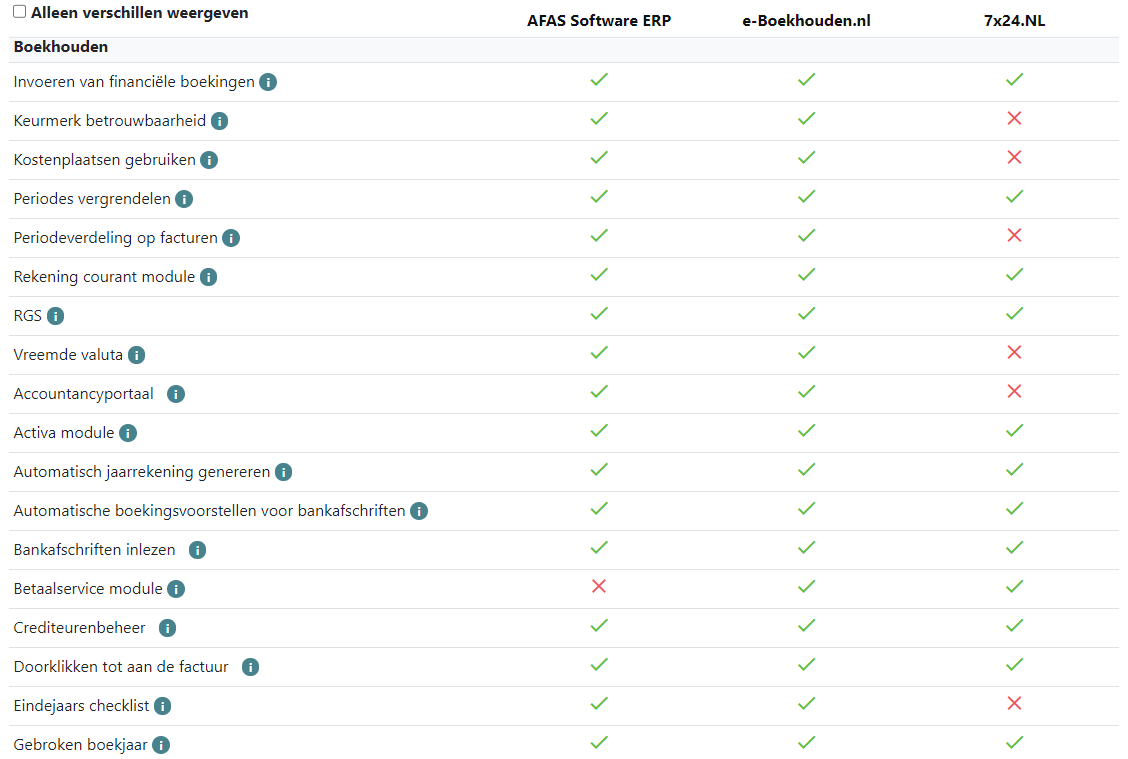
With SoftwareWatcher you can also create a shortlist of the best software for your organisation yourself. A handy aid for this is one of our selection guides or our filters. Once you have specified your preferences, you get an overview of suitable software. You can then compare these systems with each other. See also the image below.
Tip
Our article on "tips for selecting software for businesses" also contains a number of handy tips for carrying out this step of the selection process, namely:
- Be open to adapting business processes to the software standards
- Check the integration options to digitise further
- Save money by choosing a pricing model that suits your business
- Request one or more software demos
- Make free use of the software experts at SoftwareWatcher
Step 4: Schedule software demos
Next, schedule software demos with the software suppliers on your shortlist. During a software demo, a software supplier gives a demonstration of their software. A software demo is valuable for the following reasons:
- Find out about the quality of the software features
- Get an impression of how user-friendly the software is
- Get to know the people behind the software
- Ask substantive questions about the software
- Get an accurate indication of the cost of the software
- Find out whether the software suits your organisation
Step 5: Select the best software
Once you have received a software demonstration from all the software suppliers on your shortlist, the next step is to choose the software that suits you. If you are still not entirely sure, or still have a few questions, you are always welcome to contact an expert at SoftwareWatcher.
Step 6: Implement the software
If possible, we recommend implementing software in phases. Implementing software takes a lot of time and as a result some business processes may temporarily come to a standstill. If you want to implement all software applications at once, there is a risk that all your business processes come to a standstill, and you would rather avoid that.
Software advice from SoftwareWatcher
Do you need advice on the best software? Get in touch now and we will draw up a list of the best software for your organisation.
Non-binding and without obligation