
- 15-06-2020
- 12:00
- timer 6 minutes
Why a digital signature?
Are you interested in the benefits of a digital signature? Are you curious what you can use a digital signature for? Do you want to work more efficiently by using a digital signature? Then read this article.
In this article:
- What is a digital signature?
- How do I create a digital signature?
- Is a digital signature legally valid?
- What are the advantages and disadvantages of a digital signature?
- Which authentication methods exist for a digital signature?
- What is a proof document?
- What are the prices for digital signing software?
- Search for, compare and select digital signing software
What is a digital signature?
A digital signature is placing a signature under a digital document. This is an electronic version of the physical signature with pen and paper. It lets customers, suppliers, employees and other parties sign your documents easily and quickly, such as:
- Quotations
- Contracts
- Agreements
- Authorisations
- Accountability documents
- Letters
Placing a physical signature takes a lot of time and effort compared to a digital signature. Placing a physical signature with two signatories often goes like this:
Step 1: Printing by 1st signatory
Step 2: Signing by 1st signatory
Step 3: Scanning by 1st signatory
Step 4: Sending by 1st signatory to 2nd signatory
Step 5: Printing by 2nd signatory
Step 6: Signing by 2nd signatory
Step 7: Scanning by 2nd signatory
Step 8: Sending by 2nd signatory to 1st signatory
Step 9: Archiving by both signatories
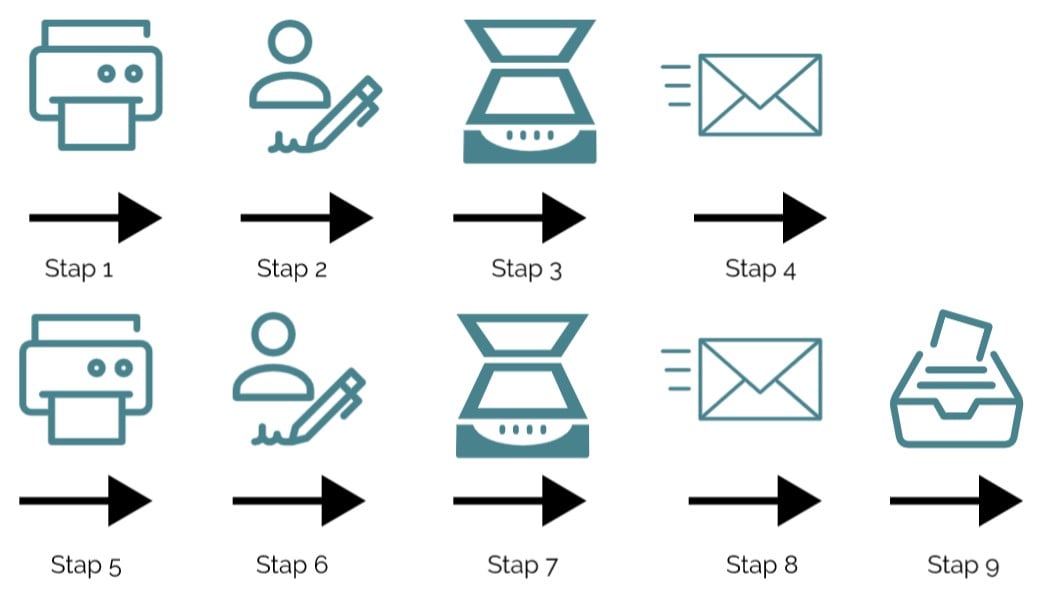
Process for placing a physical signature.
The steps above are probably familiar and, what is more, cumbersome to carry out. Of course the signatories can also arrange to meet in one central place. But that generally takes even more time.
Please note:
The digital signing process above is an example with two signatories. With more signatories this process takes even longer. After all, every signatory has to go through the same steps.
How do I create a digital signature?
Creating a digital signature is very easy with the help of software. Placing a digital signature works as follows:
Step 1: Upload the document in the software by the 1st signatory.
Step 2: Sending by the 1st signatory. The software automatically places a signature for the sender. You can set this up in advance.
Step 3: Signing by the 2nd signatory using the authentication method.
Step 4: Archiving by both signatories.
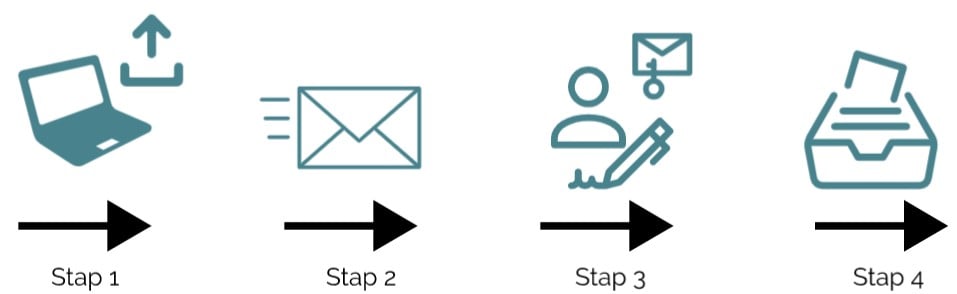
Process for placing a digital signature.
As you can see, this process is a lot faster than placing a physical signature. Instead of at least 9 steps, you are now done within 4 steps.
Is a digital signature legally valid?
In 2016 a new European regulation came into force stating that a digital signature has the same legal effect as a handwritten signature. A digital signature therefore leads to a legally valid agreement that is legally binding.
Digital signing is therefore just as legally valid as a signature on paper. It is legally valid with evidential value. A digital signature has a qualified certificate, which proves that the signature is reliable. The certificate links the identity of the signatory to the digital signature and links the signature to the document.
What are the advantages and disadvantages of a digital signature?
Signing documents digitally has a number of important advantages that allow your company to work more efficiently:
+ Saves time
The signing process is faster, which leaves you more time for other important matters. An HR department, for example, can make good use of a digital signature by having employment contracts signed remotely. Or a sales department can have a quotation signed faster, so you can get started on the assignment straight away.
+ Track progress
The software sends a notification when a document has been viewed and when a document has been signed. This makes it easy to check whether the receiving party has received the message in good order.
+ No more post
Sending post is no longer an issue at all. As well as saving time and money for employer and employee, this also creates an innovative company image.
– No disadvantages
Which authentication methods exist for a digital signature?
When you have a document signed, you want to be sure the signature is placed by the right person. For this the signatory must be identified as well as possible, so that the sender knows who has signed the document. Common methods of authentication are the following:
Email: This is the simplest form of authentication. The sender sends the document to the signatory, and if the document is signed, the sender can reasonably assume that the owner of the email address did so. This form of authentication has a number of disadvantages. More people may have access to the email account. It is also not always possible to check whether the email address belongs to the right person. Moreover, an email can be forwarded to someone else and signed via that email address.
SMS: With SMS authentication, the signatory receives a code by SMS that has to be entered with the digital signature. Additional SMS authentication makes the digital signature considerably more reliable. Moreover, it is more likely that the right person places the signature, since in addition to the email this person must also have access to the phone in order to receive the SMS code.
iDIN: With iDIN, a signatory has to log in via their bank to identify themselves. The bank then confirms the identity of the signatory. Because the signatory has identified themselves via a bank, the sender knows for certain who they are dealing with.
Other authentication methods are: iDEAL, eHerkenning, a biometric signature, IP address and DigiD.
What is a proof document?
Once a document has been signed by all parties, the sender is sent a proof document by email. This proof document contains relevant information about the chosen authentication method and can be used to demonstrate afterwards who the signatory is.
Tip:
The authentication methods differ per software package. Decide for yourself which authentication method is suitable for your business. With SoftwareWatcher's software selection you then select which authentication method the software must meet.
What are the prices for digital signing software?
Prices for digital signing software vary per software supplier. This can range from paying a fixed monthly amount to paying per signed document. The amounts often depend on the size of the company. Stating a single price per software package does not give a reliable picture of the actual costs, and comparing prices can therefore be difficult. So first look at which revenue model suits your business best. If you sign few documents, it is probably wiser to pay per signed document. If you sign many documents, paying a fixed monthly amount is more cost-effective. SoftwareWatcher has filters with which you can compare the pricing model and price ratios between software suppliers. Use the yellow "Compare Digital Signing Software" button at the bottom of this page.
Search for, compare and select digital signing software
Are you convinced of the added value of a digital signature? Are you curious which digital signature software suits your business? Or do you want to find out whether your software integrates with digital signing software? Compare and select digital signing software here.
Would you like help selecting digital signing software? Then start the software selection tool with the "start software selection" button at the top and bottom of this page and select the software that suits your business.
Software advice from SoftwareWatcher
Do you need advice on the best software? Get in touch now and we will draw up a list of the best software for your organisation.
Non-binding and without obligation